Branches or Feature Toggles?
When and how to use them.
Have you ever been requested to do a change to a system, but that change should not be visible until it is completed? Have you also been requested to launch fixes to the same system while you are changing it? Then you probably faced this problem.
Introduction
We have all been there: someone asked us to add some feature to an existing system, but that it should only be visible when it is completed. You go off and start coding. Sometime later, that same someone asks you to fix a bug, a high priority bug. But you have your code half done, and you can’t simply stash it. How will you handle this?
There are two major approaches to this: using feature branches and feature toggles. What fits best depends a lot on circumstances. In this article, I will try to break down what those circumstances are and how you can choose the strategy to use.
Branching
Branching was sold to use as the go-to method when adding disruptive features. You don’t want to break the existing code, so you create a branch and build the new features there. It all sounds great when you hear about it, but if you look under the curtains, it starts to break apart.
Don’t get me wrong: branches have their place and, when used with care, can be very effective. The problem is assuming that creating a branch is the Holly Grail, the solution to all problems. But let’s see what branching entails.
Say you have a project that is working, deployed to customers, and being maintained. Someone comes up with a brand-new feature, something that will drive sales up! You are tasked with implementing this feature. The problem is that this feature is not something you can do in a couple of days; it will take you weeks, if not months, to finish it. During all this time, you still have to maintain the application in the field with bug fixes and small enhancements. How do you handle this?
Branching is a strategy that can help you do this. You simply create a branch to develop the new feature, and away you go. You can focus on developing the new feature on the new branch. If there is a bug fix or small enhancement that needs to be done, you can use the branch without the changes to do that. All is good: you can develop the new feature, and the bug fixes and enhancements are still rolling out. Everyone is happy!
Things start to break apart when you have to apply or merge the changes between branches. It all depends on the changes you make, so it is hard to know in advance how hard it will be. Harder than knowing what the feature will be—when was the last time that features were not changed while they were being implemented?
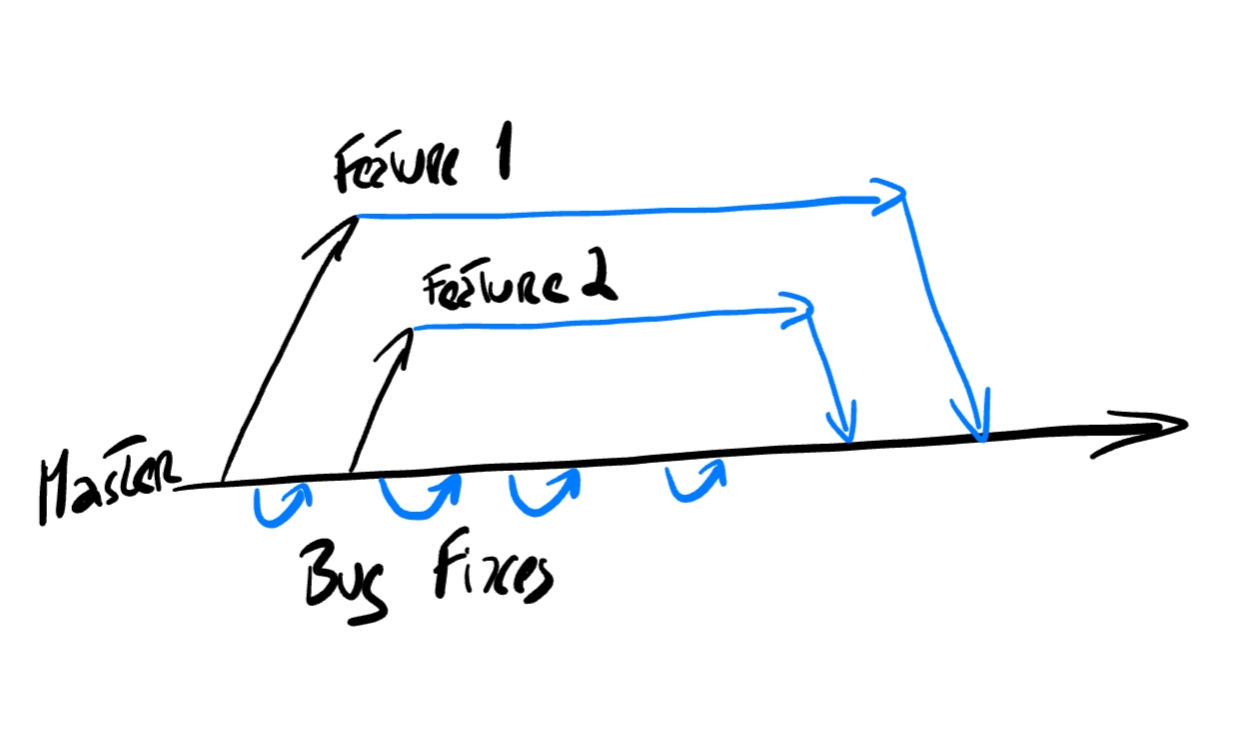
How to organize development with Feature Branches
How to organize development with Feature Branches
When to branch?
- Application without tests: if you don’t have tests, you don’t have anything that protects you from making breaking changes. Better to leave the production code alone and work on a branch where you can make the changes.
- Without a good CI pipeline—If you do not have a CI pipeline, you don’t have something that warns you as soon as you break something. If you don’t have some quick feedback for the changes in your branch, you will continue to work oblivious to some change you made that broke the application.
It might seem that branching is the best approach, but it probably is not. It is a better approach only if you have some regulatory compliance and a high-risk scenario where the changes you are making are too intrusive. If not, you are better off with feature toggles.
Even if your code is not really ready for feature toggles, it is better to make the changes needed to add feature toggles than to continue to add to the pile of code that is already hard to maintain.
Feature Toggles
Feature Toggles are an alternative to branches. With feature toggles, all your work is done on a single branch; you never have to worry about merges. To ensure that the changes you are making are not visible, you introduce a feature toggle: a switch that allows you to turn on or off the new feature.
The advantages are obvious: you don’t have to keep different branches and merge the changes and fixes from branch to branch. The difficulties are also clear: you have to ensure you don’t break existing functionality so that you are never in a situation where you can’t make a release to fix a bug. This requires some thought.
Where can feature toggles go wrong?
They can go wrong when you don’t have a good enough safety net of tests that ensure that you are not breaking anything. If you don’t have that safety net, you risk making a release with more bugs than the previous version, just because of the newly developed code.
You can also have scenarios where the development of the new feature is so intertwined that it is hard to add the new feature without changing lots of code. Some design and architecture might help in this case. You can use a Strategy Pattern for functionalities to switch between implementations or a Chain of Responsibility when they are a composition. It all depends on how you can model the new functionality so that adding it is feasible using a feature toggle.
When to use feature toggles:
- Application has good tests
- Application has a good CI pipeline
- You can model and structure your features independently
Recommendation
Do the Feature Toggles unless you have some hard reason not to do it: because it is too risky and you can’t get the buy-in from stakeholders. But no matter what you end up using, be it a branch or a feature toggle, remember that what is important is to follow the Boy Scout rule and improve things a little with every iteration. Just take a small step in the right direction.
Is the code hard to change and missing lots of tests? Add some tests! A good place to start is by reading the book “Working Effectively With Legacy Code” and start applying its concepts, step by step.
There are tests in the code, but they are not automatically executed? Change the build file to execute them automatically, or push to have a small CI do the build on every change.
Every step you can take in the right direction, in the direction of good modular and testable code, will pay back in dividends. You might think that you will not be there to see the benefits, but the reality is that you will. And as you take more steps in the right direction, things will get better, development will get faster, and stakeholders will recognize that. If they don’t, you are in the wrong place; it is time to move on!